
The challenge
NHS England required multi-factor authentication across all its services. Attend Anywhere was no exception. The platform had a single, secure factor: email and password. Attend Anywhere isn't a consumer product people log into on the sofa, it's used by clinicians and administrators between back-to-back consultations, often on shared clinical machines, often in trusts where personal phones are impractical or restricted on the ward. Every additional step between a clinician and their waiting area is a step that can run late. Get this wrong and you don't lose engagement, you delay a clinic.
For context… Attend Anywhere delivers video consultations across NHS services across the UK. Two user groups matter: clinicians, who sign in to run consultations, and administrators, who manage waiting areas and are the first line of support when a colleague can't get in.
I was Senior Product Designer and Product Owner on this. That combination mattered: I owned the design and the prioritisation, working daily with engineering, QA and stakeholder leads. When testing produced twenty recommended changes and a fixed deadline, I was the one deciding which of them shipped.
Understanding the problem
I mapped the provider journey end to end before designing anything, including the parts nobody thinks of as "the MFA project": sign in, security code, backup code, one-time email code, verify email code, reset password, new password, change password success, and the account security and setup screens in the legacy system. Email itself had to be treated as part of the journey, not a notification afterthought.
Two things came out of this exercise:
MFA isn't a screen. It's a set of states across two systems plus an email channel, and the seam between them was invisible to the user but very visible to anyone who had to maintain it.
The failure modes are asymmetric. A clinician who sets up MFA slightly awkwardly has a bad two minutes. A clinician who can't complete the second factor in a timely manner, has a waiting room and no way in. So recovery couldn't be a later phase. It had to be designed at the same time as the happy path, and arguably harder.
Research & insights
I recruited 12 participants across clinical care and administration, spread across England, Scotland, and Wales, with platform tenure from one year to five-plus and usage from daily to rare. I asked about their existing experience of MFA elsewhere, what had gone wrong, and what they did when it did. All 12 already used MFA somewhere in their working life, most commonly an authenticator app. That sounds like good news. What they reported underneath it wasn't. Their problems were almost entirely with delivery:
SMS codes arriving late.
Email codes arriving late.
Push notifications arriving late.
Authenticator app configuration failing, and
Copy-paste breaking between a mobile mail client and a browser.
Their resolutions were the part that changed the project. The most common responses to a failing second factor were waiting and doing nothing, abandoning the MFA feature entirely, or calling IT support.

Two insights reshaped the brief.
Not everyone has a phone to hand. Eight of twelve participants raised a concern that they, or the users they support, might not have a mobile device available to set up and run an authenticator app. In a clinical setting that isn't an edge case.
Some users are one email address away from being locked out. An administrator flagged that it's common for existing accounts to hold an email address that has since been superseded by an nhs.net address. Those users can't receive a forgotten-password link, and they can't receive an email-based recovery code either. Their estimate was that this could affect up to 10% of existing users. The exact figure was unknown. The risk was not.
That finding turned recovery from a UX nicety into a service continuity issue, and it surfaced before launch rather than in a support queue. The project was not "add MFA by the deadline". It was "meet the mandate without locking anyone out of delivering care". Three principles followed:
Every factor needs a working fallback. Authenticator app, then backup codes, then a one-time email code.
Setup has to be self-serve, between clinics. No IT ticket, no scheduled training.
No user should be one stale email address away from being locked out. If email is the last line of recovery, the data behind it becomes a product problem, not an ops problem.
Exploring solutions
I assessed the available factors against what research had just told me.
SMS was ruled out on reported delivery delays, which were one of the top complaints participants had about MFA elsewhere.
Push notifications weren't available to us.
Email code as the primary factor was directly requested by an administrator during testing, and I had to recommend against it: the superseded-address risk meant making email primary would push the most fragile channel to the front of the queue for every user.
Authenticator app had the strongest argument on its merits regardless of the business rule, because it generates codes offline with no delivery dependency at all.
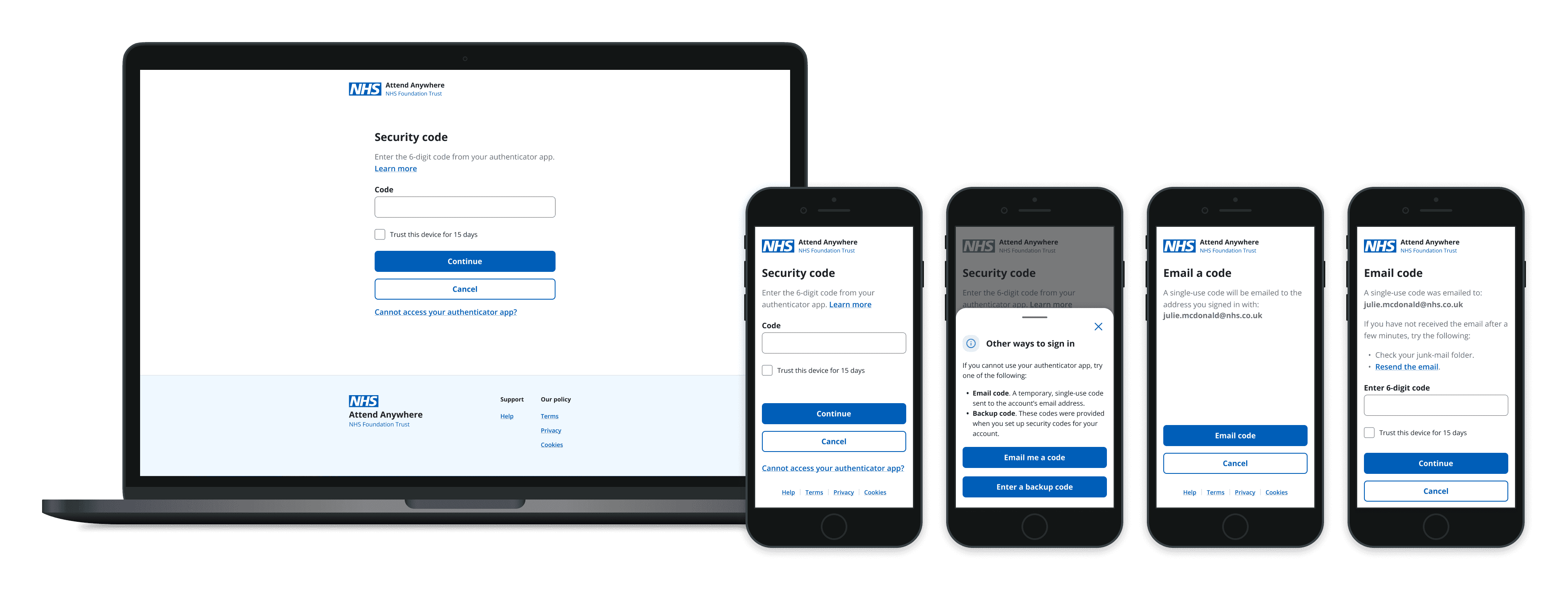
So: authenticator app as the primary factor, with two tiered recovery routes behind it. Backup codes for the user who has planned ahead, a one-time email code for the user who hasn't. The critical decision was where recovery lives. Not in help documentation, not in a support call. I put an "other ways to sign in" route directly on the security code screen, at the exact moment someone realises they can't produce a code. Recovery is only useful at the point of failure.
Design & iteration
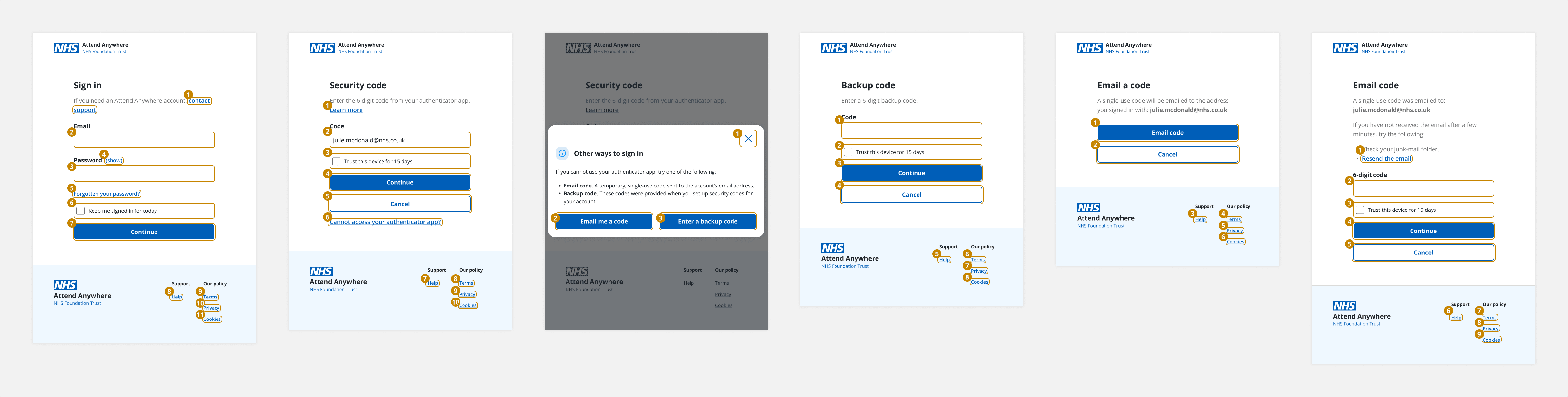
I designed the full suite: sign in, security code, the other-ways-to-sign-in overlay, one-time email code, verify email code, backup code, reset and new password, and the account security, three-step setup and MFA on/off states in the legacy system.
A few decisions worth naming.
Two systems, one journey. New auth screens were built to the design system. The legacy account security and setup screens were matched to their surrounding patterns so a user crossing into the service didn't feel like they'd been handed to a different product halfway through securing their account.
Every state specified, not just the good one. Wrong code, expired code, already-used backup code, email not arriving, changed email address. Error states are the whole product in an authentication flow.
Accessibility built in, not bolted on. Tab order was documented per screen for keyboard and screen reader users. Input focus styles came from the design system by default.
Email as a designed surface. Code emails, reset links, and a password-changed notification specified as a stretch goal, because the confirmation you didn't send is the support call you do get.
Testing & validation
I built a clickable prototype of the complete provider journey and ran a moderated study with all 12 participants across four exercises, scoring task performance and confidence separately on five-point scales, plus behavioural checks on what people actually did rather than what they said.
The exercises were chosen to cover the moments that break:
Sign in and turn MFA on.
Sign in with MFA already enabled.
Sign in without your mobile phone.
Turn MFA off.

Measure
Result
Set up MFA unaided
11 / 12
Located the MFA setting in account security
10 / 12
Completed recovery without their phone (backup or email code)
No issues logged on either route
Asked whether a specific authenticator brand was required
4 / 12
Questioned what backup codes were actually for
2 / 11
Raised device availability as a risk for themselves or their users
8 / 12

The headline pass rates were healthy. The interesting part was what people said while passing.
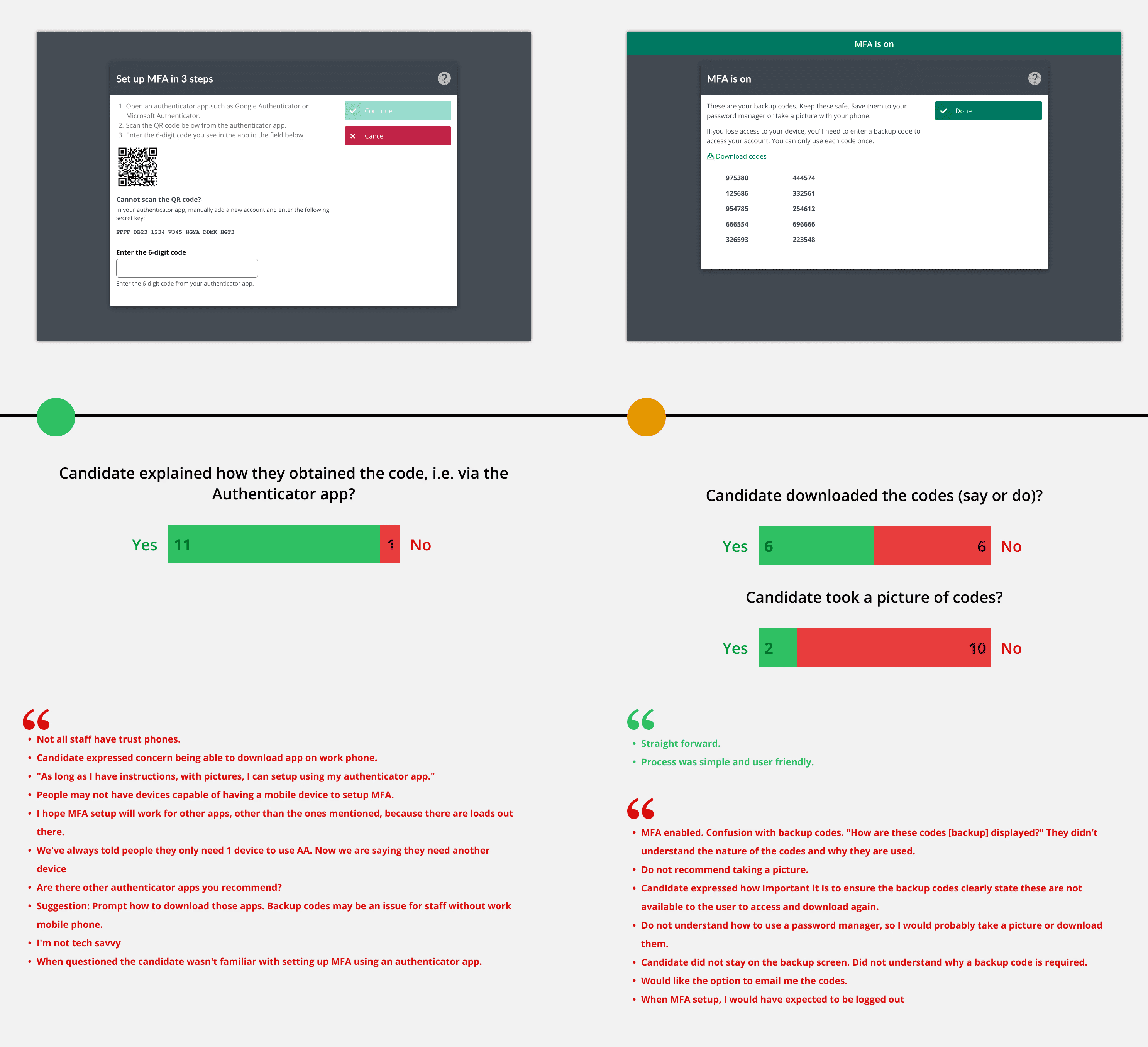
Participants succeeded and still asked where the code came from. They succeeded and still didn't know what backup codes were for. Every one of these participants already used MFA elsewhere, which means the questions they raised would be failures for the less confident users we hadn't recruited. Three participants offered to bring in exactly those colleagues for a further round.
I triaged every finding into must-have and should-have, split by whether it sat inside the design system or outside it, so engineering could work against the deadline without a negotiation for each item. What changed as a direct result:
The opening copy on the security code screen was rewritten. It raised more questions than it answered, specifically where and how to obtain the code.
The recovery CTAs were reordered. Backup code and email code were swapped, with their supporting bullets, to match the order people reached for them.
"Settings" became the word we used, because that was the word participants used when hunting for the feature.
The authenticator copy was broadened. Four participants asked whether Google or Microsoft Authenticator specifically was required. The text was changed to make clear any compatible app works, including desktop options for users without a phone.
Backup codes were explained properly. What they're for, instruction to download them somewhere secure, and a warning that the screen can't be revisited without turning MFA off and on again.
Two pieces of security advice were removed. The prototype suggested taking a photo of the backup codes and storing them in a password manager. Both came out. Handing a user bad security guidance at the single highest-trust moment in the product is worse than saying nothing.
The help link was pointed at the actual instruction page, not the help home page, because a link that lands someone in a search box at the moment they're locked out is not help.
One request was closed as impossible. Participants wanted to be told which authenticator service had been paired with their account. Engineering investigated and confirmed it wasn't technically available. I recorded it and closed it rather than leaving it drifting in a backlog.

The solution
A clinician sets up MFA in three steps from account security, in the gap between consultations, without a support ticket. At sign in, they enter a code from their authenticator app, with an option to trust the device for a set period so they aren't doing this between every clinic. If they don't have their phone, the recovery route is on the same screen. Backup codes if they saved them. A one-time code to their email if they didn't. Underneath, the journey holds together across two systems, works from mobile to desktop, has a defined state for every way it can fail, and has a documented tab order for anyone not using a mouse.

Impact & learnings
The mandate was met. MFA shipped against an NHS England regulatory requirement on a deadline that didn't move. In a compliance project that is the primary outcome, and it's binary: a design that arrives late, or that users can't complete, is a failed regulatory obligation regardless of how it looks.
The design was validated before a line of it was built. 11 of 12 participants completed setup unaided, 10 of 12 found the feature, and both recovery routes ran clean. Every change is traceable to a specific finding and a specific date. Testing wasn't a formality after the fact, it rewrote the copy, reordered the recovery options and removed two pieces of bad security guidance before they reached thousands of clinical users.
A launch-blocking data risk was surfaced in research, not in the support queue. The superseded email address problem had nothing to do with any screen I designed. It sat in the user data, and it would have presented as an unexplained wave of permanently locked-out users in the weeks after launch, in a product where being locked out means a cancelled appointment. Finding it in a moderated session and routing it to product as a pre-launch data question is the most valuable thing this research produced, and it's the lesson I took furthest: the biggest design risk in a project often isn't in the design. Ask users about their circumstances, not just their reaction to the prototype.
The device assumption was challenged early. Eight of twelve participants flagged that an authenticator app assumes a phone that not every clinician has available. That moved backup codes and email codes from alternates to the core of the design, and it confirmed something I'd now treat as a rule in any authentication work: recovery is the product. The happy path is the least interesting part of it.
Familiarity isn't ease. All twelve participants already used MFA elsewhere. They still asked where the code came from and what backup codes were for. Success rates from confident users are a floor, not a verdict, and the design has to serve the people you didn't manage to recruit.
A fixed business rule constrains the factor, not the experience. I couldn't change the primary method. I could make sure nobody was stranded behind it, and that's where the design effort went.
Owning the backlog changed the output. As both designer and product owner, I could triage findings into must-have and should-have the week they came in, and close the one impossible request quickly. On a fixed regulatory deadline, that's what let the research shape the build instead of trailing it.