
Overview
Attend Anywhere is a healthcare video consultation platform used across the NHS. At its peak, it was one of the most widely deployed tools of its kind in the UK, connecting patients with clinicians without requiring either party to download anything. Just a link, a browser, and a connection.
I joined the product team at a point where the underlying technology was evolving and the experience layer was lacking. The platform had scaled significantly, particularly through the pandemic, but the call screen that most patients and clinicians were staring at had changed very little since it was last built. The gap between what it offered and what people now expected from a video call had become wide enough to affect clinical outcomes, not just user satisfaction.
Setting the direction
The existing call screen had been in production for over a decade. Auditing it screen by screen, across three mobile states and two desktop views, showed a consistent set of problems, not isolated bugs. Several of them carried direct clinical risk, not just usability friction. A few things stood out:
The layout wasted the screen. On mobile, the video tile occupied roughly a quarter of the available height, with a large dark empty space beneath it serving no purpose. Controls were stacked as a vertical column with no grouping or hierarchy.
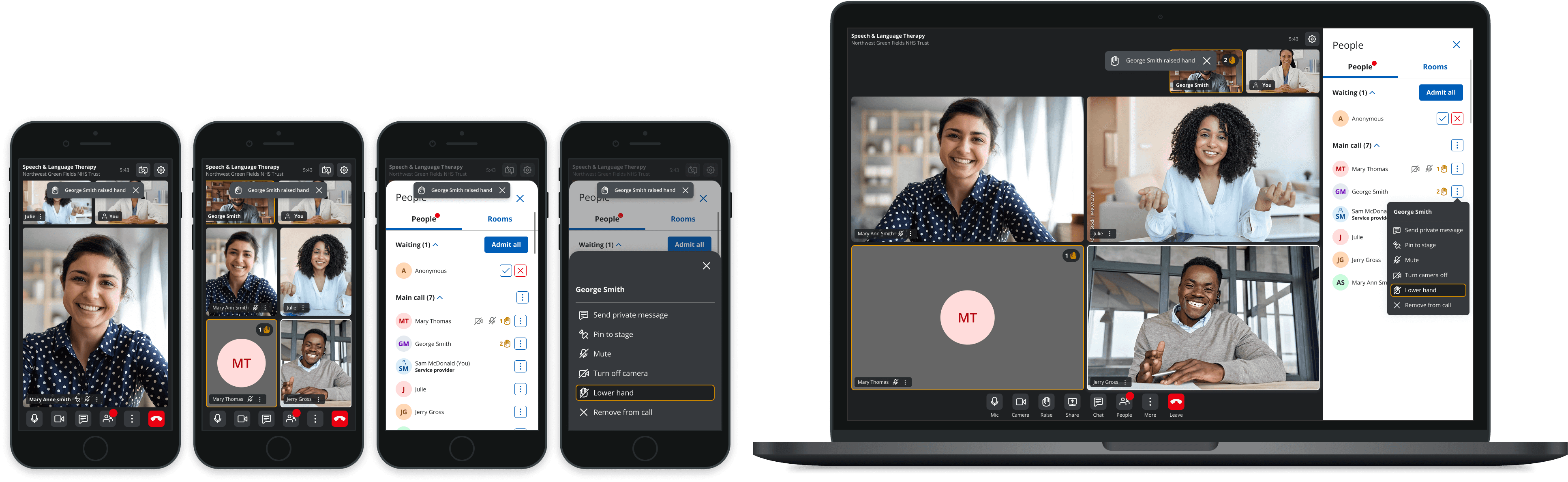
There was no participant management. No waiting room indicator, no queue, no way to see who was waiting to join without leaving the main call view. Managing a multi-patient consultation was impractical.
Opening chat removed the patient from view. The patients video was blocked when the chat window was open on desktop and tablet views.
Accessibility gaps ran through the interface. Icon-only controls with no labels, undersized touch targets, colour contrast failings, chat input that relied on placeholder text alone for instruction, and no visible keyboard navigation or focus indicators.
Calls were capped at four people. In a clinical setting where a consultation might need a patient, an interpreter, a family member, and more than one provider, that ceiling was a real limitation on how the platform could be used.
However, the interface's complexity, with overlapping technical, UX, and clinical constraints, made a full redesign in a single sprint unfeasible. To ensure quality outcomes and minimise risk, the redesign was broken into smaller, strategically defined deliverables. Each was supported by focused research, analysis, and iterative design, allowing for improvement while aligning with an agile delivery.

Defining the constraint set
Before setting a design direction I needed to understand what I was actually designing within. NHS clinical guidelines, GDPR requirements for patient data, and clinical safety standards all imposed constraints that a standard video calling redesign simply wouldn't encounter. They drove the design brief.
I built relationships with healthcare customers across England, Scotland, and Wales to ground the requirements in real operational contexts, not assumed user needs. Internally, I led a core team of one UI designer and one UX writer, working alongside two development leads and two QA leads. I didn't manage the engineering or QA leads directly, but I set the direction they built and tested against, and stayed closely involved in how that translated into delivery.
The milestones, and what drove them
Each piece of work below was a strategic choice about where to invest, not a feature request worked through in order.
Information architecture and layout
I started here because nothing else would land well on a broken visual foundation. Testing across devices and orientations confirmed a fixed layout failed consistently on mobile, and the control hierarchy had no real logic to it. Clinicians were looking for things they needed regularly, and in many cases not available. I redesigned the tile system to adapt by device and resolution, and established a clear IA that separated always-visible primary controls from secondary functions one tap away. Getting this right first gave every subsequent feature a stable surface to sit on.

Designing for real screen constraints
Before I could commit to a layout, I needed to know how much screen a clinician could actually rely on. So I pulled real usage data, over 200,000 pageviews, to see what browser heights looked like in practice rather than assuming the 1080p viewport we default to when designing. Most clinical settings only have one display, and that display has to do two jobs at once: run the video consultation and give access to note-taking or the patient's clinical record. That constraint shaped everything that came after it, how much could stay visible without scrolling, and how much needed to be tucked away as secondary.
I also ran an analysis of profile image usage across active accounts, to settle whether the feature was worth the design effort:
Uptake was low, but quality wasn't the problem. Where people had uploaded a photo, the large majority were clear and identifiable.
People take more care over a photo of themselves than a generic waiting room image, so the feature earns its place on screen.
Rather than judging images against a fixed pixel threshold, the decision was to keep them if they served their purpose, recognising the person, not to reject them on image processing quality alone.

Control placement
A video consultation screen has to work for two different people, patients and healthcare providers, and in two different situations, one to one calls and group calls. Too many features on screen and it's overwhelming for someone who's already nervous about a medical appointment. Miss something and a provider can't manage their waiting room properly.
Benchmarking the competition
I looked at our competitor platforms, BlueJeans, Zoom, Teams, GoToMeeting and others, and compared how they handled CTA and information placement. Not just a general look at their screens but a scored comparison: how many CTA panels are visible at once, how consistent primary and secondary actions are, how many combine controls without any visual separation.
This gave me something to work from instead of a gut feeling. Fewer panels on screen generally means less cognitive load, and most competitors weren't consistent about it. 80% of desktop competitors blurred the line between primary and secondary actions. Only 40% showed basic call information like duration or queue position, even though that's the kind of detail people care about while they're waiting for a clinical appointment. In a healthcare setting, a waiting room might have dozens or hundreds of people in it. Leaving that information out is a real usability gap, not a small one.


Mapping the architecture
From there I mapped the information architecture, separately for patients and providers, and separately again for one to one versus group calls.
For each, I broke the screen down into functional layers: always visible functions like end call, camera and mic, communication tools like chat, screen share and raise hand, people management like who's in the call and who's waiting, and device management. Then I worked out what needed to be primary, what could sit as secondary, and what only needed read only status, since a provider managing a queue of patients has different priorities to a patient waiting for their one appointment.
This also fed into the roadmap. Some features that make sense for a provider, like transferring a caller or managing participants or audio recording controls, don't belong on a patient's screen. Others, like screen share, need to exist for both but with different levels of prominence. Having this mapped out meant every screen decision after this point had a clear reason behind it, rather than being argued from opinion in a review.

Participant management
Managing participants and waiting callers became the highest-priority clinical workflow improvement once I understood how clinicians were actually working. Managing who was on a call, and who was waiting to join, meant breaking attention away from the consultation itself. I made the case for a dedicated participant canvas, a single panel to see, admit, and manage everyone without looking away from the call, because the cost of not solving it was a distraction. The raise hand feature and queue management were part of the same argument: the clinician's attention is the scarce resource, and the interface should protect it.

Chat. Private versus group
The redesign wasn't a single sprint. It was a sustained cycle of research feeding into design, and design surfacing new questions worth researching. The clearest example of that loop is chat. Early in the project, research into how people were actually using group calls revealed something the original interface hadn't anticipated: patients were typing personal details into a group chat that was visible to every participant on the call. They didn't know it was public. They had no reason to assume it wasn't private. The interface gave them no signal either way.
That finding drove a specific design decision: private messaging to the healthcare provider became the default, not an option buried in a settings menu. It's a small change on screen. It's a significant one for someone sharing a medical history.
We ran the same kind of research process for other features: grid view layout, screen share behaviour, notification visibility. Using competitor benchmarking to understand emerging conventions and usability observation to test whether our interpretations of those conventions actually worked for clinicians and patients in a healthcare context, not just in a general video calling one. Healthcare adds constraints that others don't have: clinical urgency, privacy sensitivity, users who may not be comfortable with technology, and call contexts that can carry real emotional weight.


Outcome: A privacy-aware messaging system built for regulated, multi-participant consultations
I designed the full messaging model for group (and regular) consultations, covering public chat, provider-initiated private messaging, and the notification system that keeps everyone aware of who can see what. Video consultations in healthcare aren't like a normal group chat: patients and providers need total clarity about message visibility, and the platform needed to enforce that clinical boundary at a system level, not just communicate it.
A few decisions I made that shaped the outcome:
Providers control privacy, callers don't. Only a provider can initiate a 1:1 private thread with a caller, and once initiated, it can't be switched off mid-call. It reflects who's accountable for the conversation in a clinical setting.
Visibility is always stated, never assumed. I designed a contextual warning notification that changes copy depending on role and chat state ("Messages are seen by everyone" vs. "...unless sent privately"), so no one is ever guessing who's reading their message.
Defaults do the safety work. "Send to Everyone" is the default in every case, with private recipients requiring deliberate selection, reducing the risk of a caller accidentally exposing something to the group.
Consistency across devices. I mapped this across desktop, tablet, and mobile (portrait and landscape), including edge cases like the on-screen keypad pushing chat content and notifications out of view, and where I couldn't fully resolve a constraint (mobile landscape), I documented it as a known limitation rather than papering over it.
The result was a chat system that scales cleanly from a 1:1 consultation to a multi-participant call with several providers and observers, without ever leaving ambiguity about who's seeing what.

Accessibility. Working with RNIB
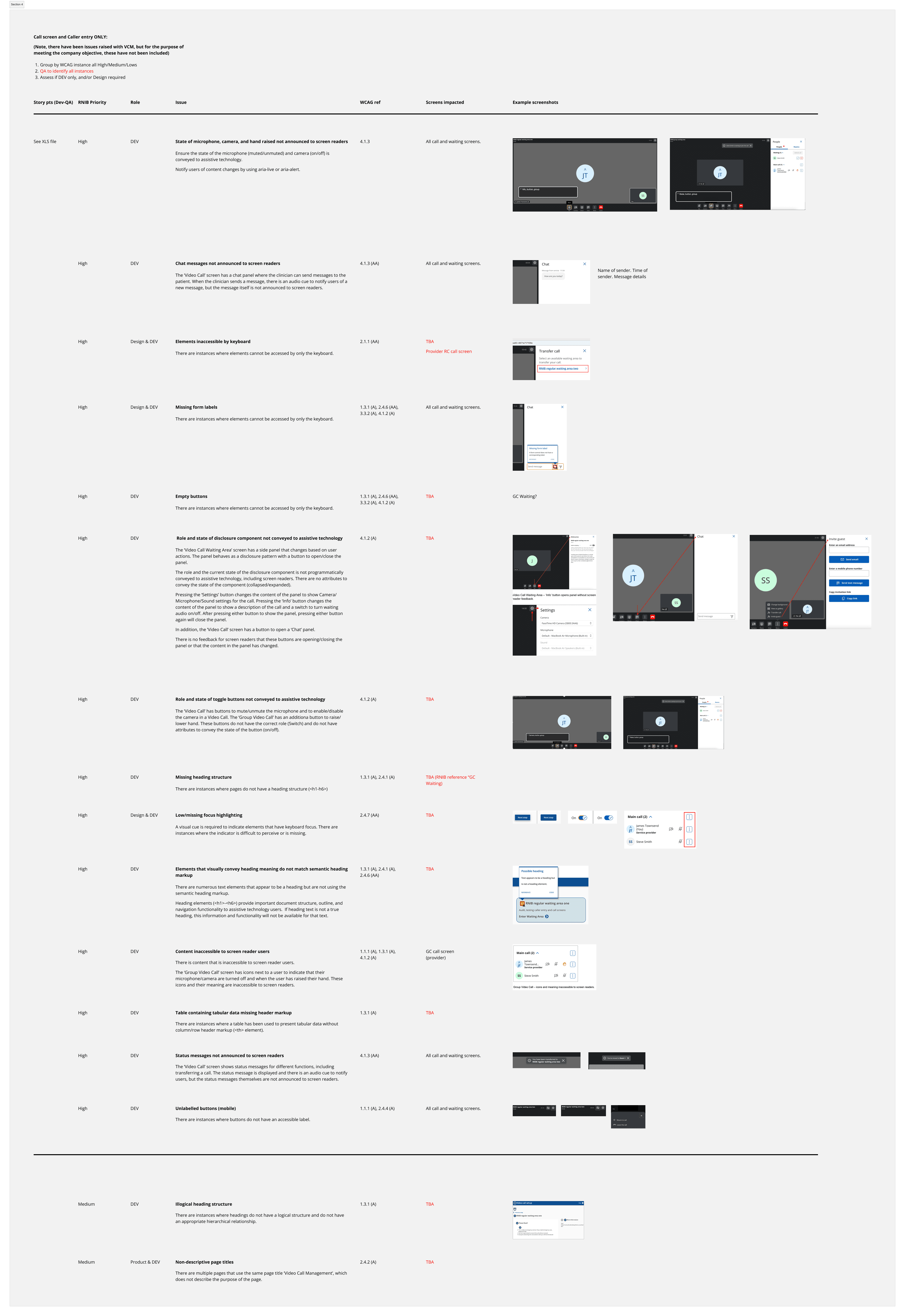
A significant part of the redesign extended beyond visual interface improvements to ensuring the platform met WCAG 2.2 accessibility standards. Working closely with the Royal National Institute of Blind People (RNIB), I translated accessibility audit findings into detailed, developer-ready user stories and acceptance criteria within Jira. This covered improvements such as making disclosure controls correctly expose their expanded and collapsed states to screen readers, ensuring chat messages were announced appropriately without disrupting users, restructuring chat conversations so they could be navigated logically by assistive technologies, improving focus management across dynamic panels, and providing meaningful status updates for new messages and interface changes. Rather than treating accessibility as a compliance exercise, the work focused on creating a more inclusive consultation experience for clinicians and patients who rely on screen readers and keyboard navigation, while giving engineering and QA teams clear, testable requirements aligned with WCAG 2.2 success criteria.

Outcome
By the time the core programme wrapped, the call screen was a different product. Not just visually, but structurally: a component system that could carry new features without each one becoming a new design problem, and a participant management experience clinicians preferred over the tools they'd been using before.
The accessibility work moved from audit to delivery, with WCAG 2.2 changes implemented in production and documented thoroughly enough that the development team could maintain and extend them confidently. That last part matters to me. Design that only lives in Figma isn't finished.
The features that came out of this programme are now in the hands of the clinicians and patients who needed them: private messaging, background control, participant queuing, raise hand, grid view, and a mobile experience that actually works at the scale the data always told us it needed to. Each one has a research thread behind it. And each one was the result of a deliberate choice about what to solve, in what order, and why.
Feedback from administrators and clinicians across NHS England, Wales, and Near Me (Scotland) was consistently positive. The response across both services was overwhelmingly in favour of the redesign over what it replaced.
"The Attend Anywhere system is simple to use, anyone can access from a mobile phone, tablet or computer and our teams are on hand to support you through the set up…
…an excellent way to empower patients and support their choice in how they access care."
Dr Anthea Cree, Clinical Oncologist. Clatterbridge Cancer Centre NHS Foundation Trust
"I think it's an overwhelming positive feedback, especially for the A&E Attend Anywhere service."
Clinician. A&E. Moorfields Eye Hospital
